Every Quality Signal Captured. Every Action Closed.

Quality Events bring together every record that signals a problem or change: nonconformances, CAPA, RMA returns, change controls, and customer complaints. Each module has its own tailored workflow — an NC moves Open → Investigation → Disposition → Closed, a CAPA runs the six-step Initiated → Investigation → Root Cause → Action Plan → Implementation → Effectiveness Check → Closed, an RMA tracks customer-driven returns through Requested → Approved → Received → Inspecting → Dispositioned → Closed.

What makes Synesis QMS different is closed-loop linkage. A failed audit creates a CAPA. An NCR escalates to a CAPA when severity warrants. A customer complaint creates an NCR which links to RMA and CAPA. A change control links to document revisions and training updates. The system tracks the full chain of cause and corrective action, while AI assists with root-cause analysis using 5-Why, Fishbone, and Fault Tree methods.

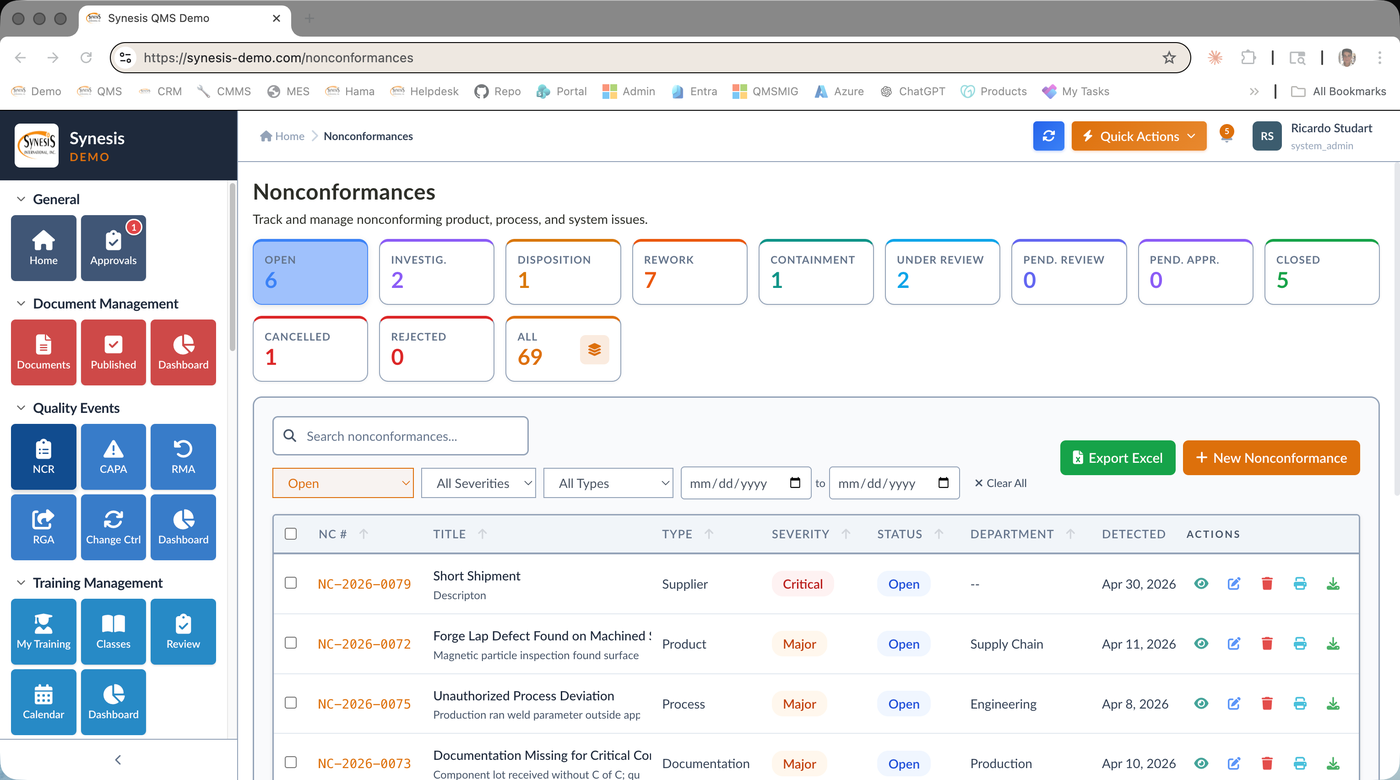
Synesis QMS Nonconformances list with status filters and severity tracking
Nonconformances list — track product, process, material, and documentation NCs with severity, type, and status.

Quality Event Modules

Nonconformance (NCR)

Product, Process, Material, Documentation

Severity scoring, containment actions, disposition (rework, use-as-is, scrap, return, deviation, concession). Photos and attachments at every step. Auto-link to suppliers, work orders, and related quality records.

CAPA — Six-Step Workflow

AI-Assisted Root Cause

Initiated → Investigation → Root Cause → Action Plan → Implementation → Effectiveness Check → Closed. AI suggests root cause categories and proposed actions. Effectiveness verified after implementation.

RMA — Customer Returns

8-Stage Workflow

Requested → Intake Review → Approved → Awaiting Return → Received → Inspecting → Dispositioned → Closed. Track shipping, inspection, replacement, refund, and credit. Linked to NCR, CAPA, SCAR for full traceability.

RGA — Supplier Returns

Outbound Returns

Mirror flow to supplier. RGA records track item shipped back to supplier, supplier disposition, replacement or credit received, and resolution time. Powers supplier scorecards.

Change Control

Impact Assessment & Approval

Process, product, and system change requests. Impact and risk assessment, cross-functional review, multi-stage approval, implementation tasks, and linked document and training updates.

Customer Complaints

Unified Intake

Single intake portal for customer complaints. Investigation, response tracking, automatic linkage to NCR and CAPA. Trend analysis identifies systemic issues across customers and product lines.

Quality Events Hub

Deviations & Observations

Catch-all intake for deviations, incidents, findings, observations, and notifications that don't fit a specific module. Triage to the right workflow without losing the signal.

Closed-Loop Linkage

Cross-Module Traceability

Every record is linked to upstream causes and downstream actions. From a CAPA you can trace back to the NCR that created it, the audit finding that escalated, and the supplier batch that started it all.

Closed-Loop Quality — Real Examples

Audit → CAPA

An audit finding marked Major auto-creates a CAPA. The auditor's narrative becomes the CAPA initiation. Effectiveness checked at the next audit cycle.

Complaint → NCR → CAPA

A customer complaint creates an NCR for the affected lot. If a pattern emerges, the system suggests escalation to CAPA with linked complaints, NCRs, and RMAs as evidence.

NCR → RMA → SCAR

An incoming material NC triggers an RMA back to the supplier and a SCAR if the supplier's quality scorecard crosses a threshold.

Change → Docs → Training

An approved change control automatically initiates revisions to affected documents and assigns training to impacted employees before the change goes live.

Frequently Asked Questions

What is CAPA software and how does it work?

CAPA software guides corrective and preventive actions through a structured, traceable workflow: initiation, investigation, root cause analysis, action planning, implementation, and effectiveness verification. Synesis QMS CAPA software supports proven root cause methods such as 5-Why, Fishbone, and Fault Tree Analysis, and it links each CAPA back to the nonconformance, complaint, or audit finding that triggered it. For manufacturers this means every problem is closed out with documented evidence that the fix actually worked.

How does CAPA and nonconformance software support ISO 9001?

ISO 9001 Clause 10.2 requires manufacturers to react to nonconformities, evaluate the need for action, and verify effectiveness. Synesis CAPA and nonconformance software enforces exactly that loop, capturing the nonconformance, its containment and disposition, the corrective action, and the effectiveness check in one auditable record. It also supports ISO 13485, IATF 16949, and AS9100, so the same system serves regulated and automotive manufacturers.

What is the difference between a nonconformance and a CAPA?

A nonconformance (NCR) records a specific instance where a product, process, or material did not meet requirements, along with its containment and disposition such as rework, scrap, use-as-is, or return. A CAPA addresses the underlying cause so the problem does not recur. In Synesis QMS CAPA and nonconformance software, an NCR can escalate directly into a CAPA, keeping the disposition and the root cause investigation linked for full traceability.

Can the CAPA software integrate with SAP Business One?

Yes. As an SAP Gold Partner, Synesis offers native SAP Business One integration so nonconformances and CAPAs can reference the same items, batches, suppliers, and orders used in production and purchasing. Combined with links to audit findings, complaints, and supplier corrective actions, this gives manufacturers true closed-loop quality traceability on the Synesis QMS platform, and the software can be deployed in the cloud or on-premise.
Close Your Quality Loop

See how nonconformances, CAPA, RMA, and complaints connect into a single closed-loop quality system.

Request a QMS Demo