Course Catalog
Classroom, Online, OJT
Build courses with type (Classroom, Online, On-the-Job, Document-Based), duration, passing score, retraining period, instructor, and content references. Activate or retire courses as needed.
Role-Based Assignments, Document-Driven Retraining, Audit-Ready Evidence
Training Management connects competency requirements to roles, departments, and controlled documents. When a Work Instruction is revised, every employee who works to that instruction is automatically assigned the updated training before the change takes effect. When a new hire joins a role, their full training matrix is populated based on their role definition — no manual lookup, no missed courses, no audit findings.
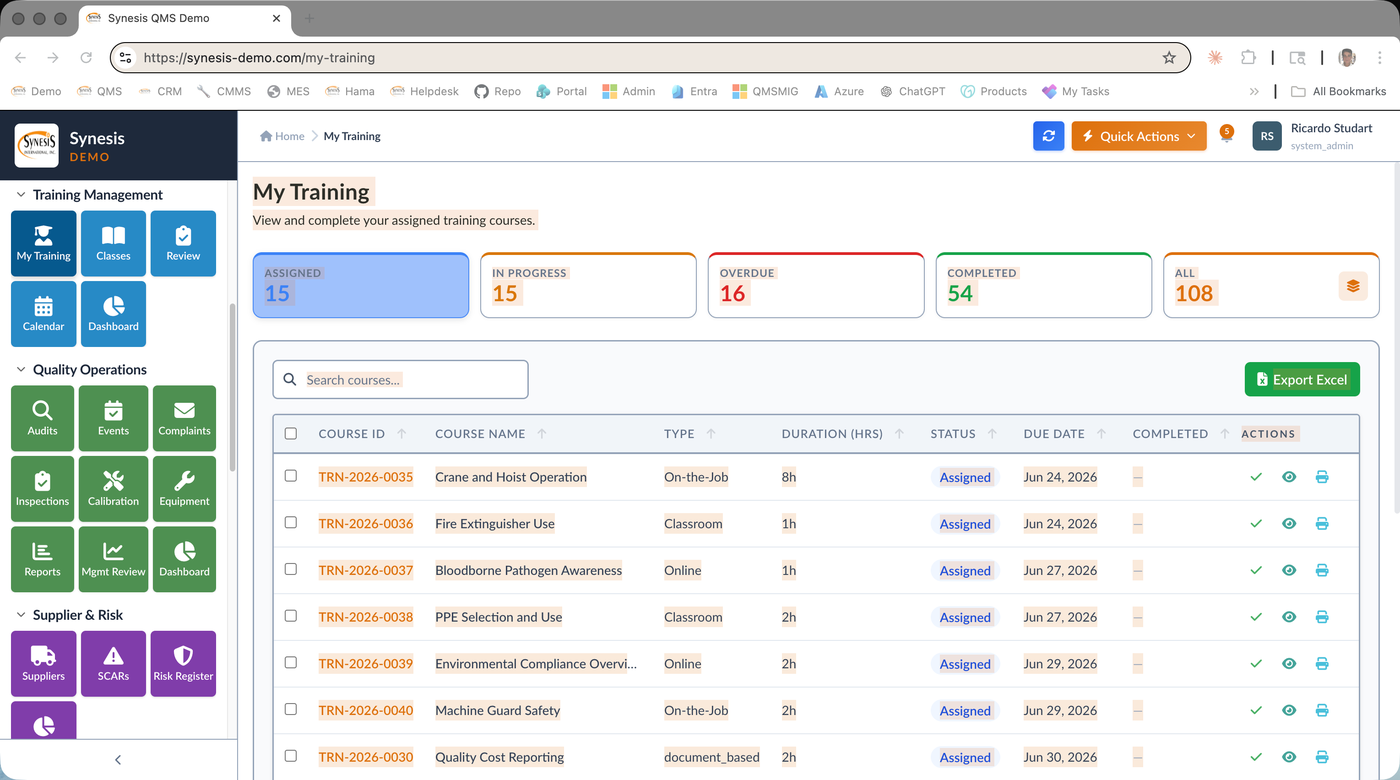
The catalog supports classroom, online, on-the-job (OJT), and document-based courses with passing scores, retraining periods, and instructor assignment. Each employee has a personalized My Training view showing assigned, in-progress, overdue, and completed courses. Trainers schedule classes through the calendar. AI assists with course description authoring, learning objectives, and outline generation. Every assignment, completion, score, and signature is stored as audit-ready evidence.
Classroom, Online, OJT
Build courses with type (Classroom, Online, On-the-Job, Document-Based), duration, passing score, retraining period, instructor, and content references. Activate or retire courses as needed.
Auto-Assignment
Map courses to roles and departments. New hires automatically receive their full training matrix. Role changes trigger gap analysis and net-new assignments.
Workflow Integration
Effective document changes auto-create training assignments for affected employees. Training must be completed before the document version becomes effective for the trainee.
Frequency-Based
Per-course retraining period (3 months, 6 months, 12 months, 24 months, custom). Automatic re-assignment when due. Notifications fire 30 days before due, on due, and on overdue.
Calendar & Roster
Schedule classes with date, time, location, instructor, and roster. Calendar view filters by trainer, course, or department. Attendance recorded with electronic signature.
Evidence on Demand
Record completion with score, date, instructor signature, and trainee signature. Optional quiz integration. Failed courses auto-reassign.
Self-Service Visibility
Every employee sees their assigned, in-progress, overdue, and completed training in one place. Filter by status. Print certificates of completion.
OpenAI-Powered Content
AI assists course authors with description expansion, learning objectives generation, content outlines, and reformatting. Preview before applying.
Define competency requirements per role. Map courses to competency requirements. Verify competency through training completion and scoring.
Auto-assign quality policy and quality manual training to all employees. Track read-and-understand acknowledgment alongside formal training records.
Pass/fail scoring on courses. Trainer sign-off for OJT. Effectiveness check via audit observation and post-training quality data.
Auditor asks for training evidence on a specific employee, role, or document — print or export the matrix in seconds. Always current, always traceable.
Training management software tracks who needs which training, who has completed it, and when retraining is due, all tied to roles, departments, and controlled documents. Synesis QMS training management software builds a training matrix so manufacturers can see competency coverage at a glance, assign courses, record completion and scoring, and prove that employees are qualified for the work they perform. It replaces sign-off sheets and spreadsheets with an auditable system of record.
ISO 9001 Clause 7.2 requires manufacturers to determine necessary competence, provide training, and retain evidence of it. Training management software does this by linking each role and document to required training, recording completion with dates and scores, and keeping a complete audit trail. The same system supports ISO 13485, IATF 16949, and AS9100 competency requirements, so a single tool covers regulated, automotive, and aerospace manufacturers.
Yes. When a controlled SOP or work instruction is revised in document control, the training management software can automatically assign read-and-understand or retraining tasks to the affected employees. This closes a common audit gap where procedures change but the workforce is never re-trained. Managers see outstanding and overdue assignments on a dashboard, so nothing slips through before the next ISO 9001 audit.
Yes. As an SAP Gold Partner, Synesis offers native SAP Business One integration, and the training management software also works with Microsoft 365, Teams, and Outlook for assignments and notifications. Training records connect to the rest of the Synesis QMS platform, including CAPA actions that require retraining and audit findings that highlight competence gaps, giving manufacturers closed-loop traceability whether deployed in the cloud or on-premise.
See how role-based assignment and document-driven retraining reduce training gaps to near zero.
Request a QMS Demo